
Separator Labels for FBA and WFS: Why Warehouses Need Them at Scale
This article breaks down why Amazon FBA and Walmart WFS label batches create a structural risk for wrong-label mistakes, and why that risk grows with batch size, multi-operator workflows, shift handoffs, and 3PL operations. It explains the three Separator formats in Label Resizer, walks through how to enable the feature, and lays out where separators fit into a standard warehouse prep pipeline. The practical takeaway is a clear threshold for when separators shift from optional to operationally necessary.

When Amazon or Walmart generates a product label batch, every FNSKU or ASIN in that shipment gets stacked into one continuous PDF, with no marker showing where one product’s labels end and the next one’s begin. Label Resizer’s Separator feature inserts a dedicated label — or a page break — at every FNSKU boundary, so the transition between products is visible before a label ever gets applied to the wrong box.
Why FNSKU Batches Create a Structural Problem
Amazon’s and Walmart’s label generators produce one flat PDF per batch, regardless of how many distinct products are in it. A five-product shipment and a thirty-product shipment come out looking identical: page after page of labels with no header or divider marking a group change. That works well for a single SKU, but once multiple products share the same file, operators have to identify every group boundary manually — counting quantities, cross-checking a packing list, or remembering where they left off.
A few factors decide how much that risk actually costs a business, and they reinforce one another:
- Batch size. A two-product batch is manageable by memory. A fifteen-FNSKU batch prepped over several hours isn’t — every added product is another transition point, and fatigue over a long session makes each one riskier than the last.
- Multiple operators. In a warehouse, one person usually prints, another sorts, another applies labels. Each handoff strips away whatever context the previous person was tracking in their head, and nothing in the PDF replaces it.
- Shift changes. A batch started on one shift often isn’t finished by the next. The incoming operator has to guess where the last one stopped, with nothing but a stack of paper to go on.
- 3PL operations. For a warehouse prepping shipments for multiple sellers, a wrong-label mistake crosses into another client’s inventory, turning an operational slip into a contractual and trust problem.
Consider a warehouse processing multiple client accounts through the same prep line. Every account adds its own set of group boundaries, and every shift change adds more on top of that. None of those boundaries are marked in the source PDF, so whatever tracking method the floor relies on has to hold up across every one of them without a single slip.
Three Separator Types, Three Different Jobs
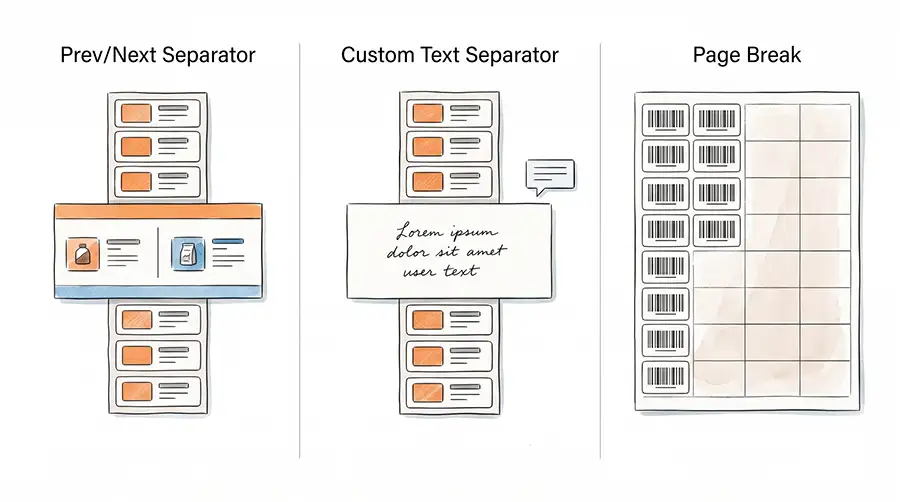
Label Resizer’s Separator feature offers three formats, each suited to a different kind of prep workflow.
Prev/Next Separator
This inserts a label between FNSKU groups showing summary information for both the group that just ended and the one about to start — barcode text, ASIN or FNSKU, MSKU, and product title on each side. It’s built for situations where the person applying labels needs full context at the boundary without stopping to look anything up. This is the strongest fit for multi-operator and shift-handoff scenarios, since it carries the information forward regardless of who’s standing at the table.
Custom Text Separator
This format lets the user define exactly what text appears on the separator — a bin location, a batch reference number, a prep note, a warehouse code — rather than pulling structured product data automatically. A popup prompts for the text before each label generation. It fits situations where the boundary marker needs to communicate something specific to a team’s own process.
Page Break
For sheet-based printing formats — 21-up, 24-up, 30-up, 40-up Avery-style label sheets — inserting a physical label between groups doesn’t work, since the labels are pre-cut into a fixed grid. Page Break forces a new page to start at each FNSKU boundary, so no single product’s labels are ever split across a sheet. In sheet-print mode, this replaces the separator label entirely.
Enabling the feature takes three steps in the dashboard:
- Go to Product → Product Label Settings.
- Toggle on Add Separator, choose a type — Prev/Next, Custom Text, or Page Break — from the dropdown, and save.
- If Custom Text is selected, a popup asks for the separator text right before each label generation.
From there, separators are inserted automatically at every FNSKU boundary, whether labels are generated through the web uploader, the CSV uploader, or the browser extension — no manual insertion, no post-processing. A full walkthrough with screenshots is available in the step-by-step guide.
The Real Cost of a Wrong-Label Mistake
“Labeling mistake” sounds minor until it’s traced through to the end of the process. A customer receiving the wrong barcode sticker means a return, a restocking or disposal cost, and often a complaint tied to the seller’s account rather than the product. On Amazon, a pattern of mislabeled inventory can also surface as inventory defect issues that feed into account health metrics. Recovering from customer complaints and fulfillment-related reviews often takes considerably more effort than preventing the mistake in the first place. A separator label, by comparison, costs nothing — it doesn’t count against FNSKU quantities and adds no extra step to generation, which makes the trade fairly one-sided once a batch has more than a handful of products.
Separators Across Amazon FBA and Walmart WFS
This problem shows up on both marketplaces equally. Amazon FBA and Walmart WFS each generate multi-product batches as a single file, and both create the same blind spot at FNSKU or GTIN group boundaries. Label Resizer applies the separator logic at the point of generation, outside the marketplace’s own export, so the same Prev/Next, Custom Text, and Page Break options work identically for either platform — useful for warehouses prepping both in the same shift.
Where Separators Fit in a Warehouse Pipeline
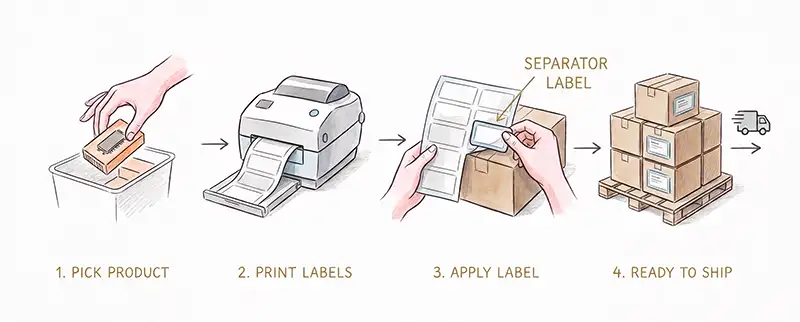
A typical prep sequence runs: pick → generate labels → print → apply → pack → ship. Without a separator, nothing in that sequence flags a group boundary — the only check is whatever the operator does manually, which varies by person and shift. With it enabled, the boundary check is embedded directly in the label file, at the point where the risk actually exists. It also shortens the ramp-up for new hires: an experienced operator can often sense where FNSKU groups change after thousands of batches, but a new employee can’t yet, and high warehouse turnover makes that gap a recurring cost. Teams documenting warehouse SOPs can simply include separator labels as part of the standard workflow.
For a batch of two or three products, a separator is still just a convenience — the FAQ even notes that a single-FNSKU batch gets no separator at all, since there’s no transition to mark. Past roughly eight to ten distinct FNSKUs, or as soon as more than one person is applying labels, manual tracking stops being realistic and the separator becomes as standard a step as a packing slip or pick list. Add shift work or a 3PL running several sellers’ shipments at once, and enabling separators by default — rather than toggling them per batch — is just operational hygiene.
Common Mistakes Teams Make Without a Separator System
- Counting labels by memory or packing-list cross-reference, which breaks down the moment the operator is interrupted mid-count.
- Relying on one experienced person to know where groups change, creating a single point of failure when that person is out.
- Treating small and large batches the same way, when the error rate on a 20-product batch is measurably higher than on a 3-product one.
- No standard hand-off method between operators, so context is lost every time a batch changes hands.
The Bottom Line
FBA and WFS batch PDFs give operators no visual reference for where one product’s labels end and the next begin, so teams fill that gap informally — through memory, counting, or experience built up over time. Prev/Next carries product context across every hand-off, Custom Text lets a team encode its own process into the batch, and Page Break solves the same problem for sheet-printed labels. Because they’re built directly into the generated label file, they scale naturally from small batches to high-volume warehouse operations.