
5 Smart Ways to Use Custom Text on Product Labels to Cut Costs and Prevent FBA Penalties
Standard Amazon FNSKU barcodes provide minimal information, forcing sellers to apply extra stickers for compliance, expiration dates, and warnings. This guide walks through five strategic ways to use header, middle, and footer custom text areas on your barcode labels, along with a step-by-step setup guide using Label Resizer to streamline prep operations, prevent warehouse teardowns, and protect your margins.

Standard barcodes like Amazon FNSKUs or Walmart WFS labels provide only the basics: a scannable code, a truncated item title, and a condition state like “New.” Because this default layout leaves out critical details, many sellers apply secondary stickers for expiration dates, choking hazard notices, or bundle warnings.
Applying multiple stickers to every unit increases your label media expenses and adds extra prep time. It also introduces room for human error. If a prep worker forgets a “Sold as a Set” sticker on a multi-pack, receiving staff at the warehouse may open the bundle and scan the pieces individually. That mistake often leads to inventory discrepancies, customer claims, and extra handling fees.
Adding custom header, middle, and footer text directly onto your primary barcode label consolidates these details onto a single print run. With the Label Resizer Free Text feature, you can easily insert custom text fields into your product barcodes during the label resizing process. This adjustment reduces overall sticker consumption, speeds up packing workflows, and helps lower avoidable receiving errors.
Strategy 1: Consolidating Compliance and Safety Disclosures
Category rules and safety guidelines often require specific disclosures on product packaging. Merging these notices directly onto your primary label reduces the need for extra stickers across your catalog.
- Country of Origin Marking: Customs regulations and platform policies require clear origin statements on imported goods, so if your factory packaging doesn’t already carry it, add MADE IN USA or MADE IN ITALY in the header section above the barcode to meet basic origin labeling standards without buying separate rolls of origin stickers.
- Safety Warnings for Small Parts: Products with small components frequently require choking hazard disclaimers, and missing them can trigger listing flags or inventory holds—placing CHOKING HAZARD - NOT FOR CHILDREN UNDER 3 YRS in the middle or footer line keeps the notice visible without extra sticker space.
- Lithium Battery and Handling Notices: Items shipped with batteries need clear handling notices for transport teams, so including CONTAINS LITHIUM BATTERY - HANDLE WITH CARE in the footer text helps carriers and receiving teams route packages without unnecessary holds.
Strategy 2: Reducing Receiving Errors and Unplanned Returns
Fulfillment center workers process hundreds of cartons per shift, relying heavily on quick visual checks. If a product consists of multiple items or requires specific handling, clear text printed on the main barcode helps guide receiving staff.
- Multi-Piece Bundles and Multipacks: A common intake issue happens when receiving staff open the poly bag of a multi-pack to scan items individually, so printing SOLD AS A SET - DO NOT SEPARATE in bold text across the header area gives them a clear notice that prevents accidental bundle separation.
- Item Content Notes: Customers with multi-piece sets—like camera kits or hardware bundles—sometimes file missing-part claims, so including INCLUDES: 1x CHARGER, 1x CABLE, 1x MANUAL on the lower margin gives buyers quick confirmation of what’s packed inside.
- Handling and Stacking Precautions: Individual units can still suffer damage during bin sorting or shelf placement even with master freight notes on the outer box, so adding GLASS INSIDE - HANDLE WITH CARE or DO NOT DOUBLE STACK onto the unit sticker serves as an extra reminder during internal movement.
Strategy 3: Simplifying Support and Order Identification
The product sticker is one of the physical details a customer notices after opening their package. Adding helpful support details directly to the sticker can improve buyer communication and make order issues easier to resolve.
- Direct Customer Support Details: Buyers with setup confusion or a suspected missing accessory often go straight to the platform return menu, so adding Questions? Contact support@brand.com or Scan for setup guide gives them a clear alternative to address simple questions before they turn into formal returns.
- Serial Tracking and Order References: Electronics and higher-value goods often need serial numbers or warranty claims verified, so printing SERIAL: XXXX-XXXX | REGISTER AT brand.com/warranty onto the unit label streamlines tracking and gives you a clear reference point when handling returned goods.
- Clear Store Identity: Plain packaging on busy marketplaces can make it hard for customers to remember which seller provided the item, so including Brand: YourBrandName and Thank You for Supporting Our Business! in the header or footer gives your packaging a clean, professional finish at no extra printing cost.
Strategy 4: Loss Prevention and Return Clear Statements
Dealing with open, used, or swapped returns is a ongoing challenge for e-commerce merchants. Warehouse teams reviewing returned items have to decide whether a box is unopened or needs to be marked as unsellable.
Adding clear condition statements to your primary label offers useful guidelines for warehouse staff checking returned items:
- Condition Notes: Adding NEW ITEM - DO NOT ACCEPT IF UNSEALED signals to warehouse workers that an opened package should not go back into sellable inventory as new.
- Tamper Disclaimers: Placing VOID IF SEAL IS BROKEN across a box opening or seam helps indicate when a unit has been opened, making it easier for intake staff to route used returns correctly.
These simple text notices give warehouse inspectors clearer reference points when grading returned goods, helping keep opened units out of your active new inventory.
Strategy 5: Preventing SKU Mix-ups and Managing Lot Dates
Sorting errors inside your own warehouse or 3PL facility can lead to mispicks that cost time and money. Sending the wrong size, color, or an expired unit leads directly to customer returns.
- Size and Color Clarification: Barcodes are made for scanners, not quick human reading, so when products share identical packaging but differ internally—like matte black versus gloss black—adding COLOR: MATTE BLACK | SIZE: XL or a check line like VERIFY COLOR: MATTE BLACK [ ] in the middle text area gives staff a visual double-check before packing.
- Expiration Dates and Lot Numbers: Marketplaces require legible expiration dates on cosmetics, consumables, and supplements, so adding EXP: 12/2027 and LOT #84920 directly to the lower text area keeps date codes and lot tracking organized right next to the barcode and simplifies shelf rotation.
Practical Label Layout Examples
Planning how you organize text across Header, Middle, and Footer zones keeps your labels easy to read while maintaining clear barcode scanning. Below are a few balanced text arrangements for common product types:
Consumables & Cosmetics
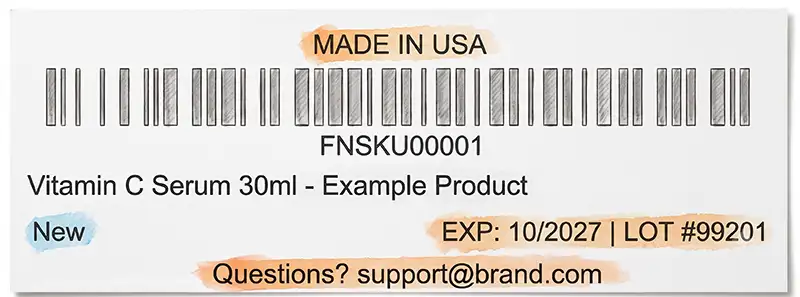
Since expiration date and lot tracking matter most for consumables, you’d design a label like this: origin in the header, EXP and LOT number in the middle, and a support contact in the footer so buyers can reach you before filing a return.
Multi-Piece Kits & Bundles
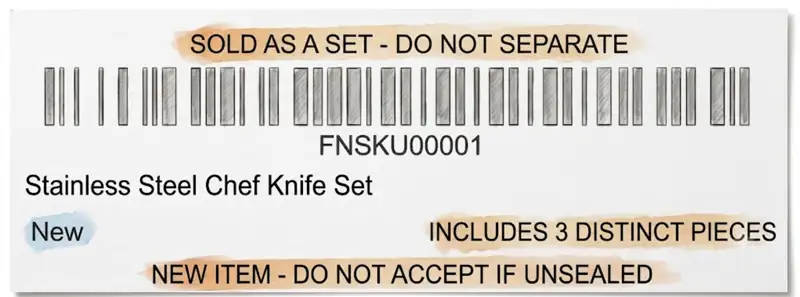
For a multi-piece kit, the header carries a clear “do not separate” warning so receiving staff don’t break up the bundle, the middle confirms exactly what’s included, and the footer flags the unopened condition for warehouse teams handling returns.
Apparel & Sized Goods
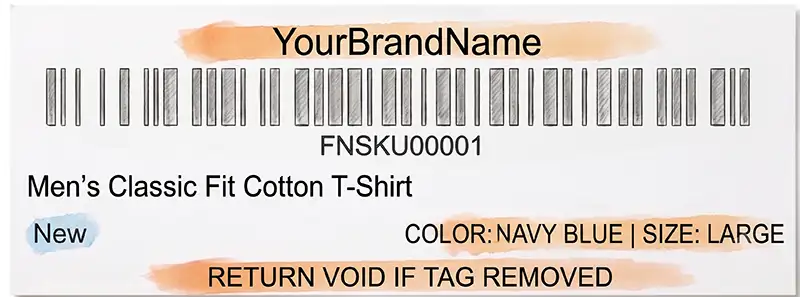
Since size and color mix-ups are the most common picking error in apparel, this layout puts your brand name up top, the exact color and size in the middle for a quick visual check, and a tag-tamper return condition in the footer.
Electronics & Hardware
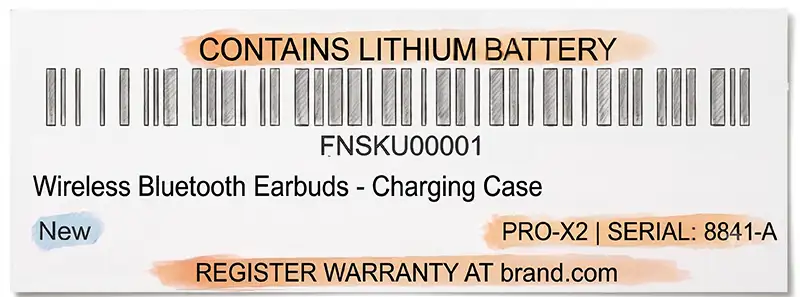
Electronics need handling and warranty details more than anything else, so the header calls out the battery hazard, the middle carries the model and serial number for tracking, and the footer points buyers to warranty registration instead of a return.
How to Add Free Text to Product Labels with Label Resizer
Setting up custom text fields on your FNSKU and product labels takes only a few seconds. Label Resizer provides built-in tools to customize three specific label areas: the Header, the Footer, and the space Next to Condition Text.
For a detailed step-by-step walkthrough, check out our full Free Text Labeling How-To Guide. Here is a quick overview of how the feature works during your normal prep routine:
- Enable the Feature: Log into Label Resizer, navigate to Product > Product Label Settings from the side menu, and turn on the Enable Free Text slider. You can also adjust your preferred font sizes for Header and Footer areas here.
- Enter Custom Information: When you generate or resize labels via the web app or browser extension, a setup window appears. You can enter specific text for individual FNSKUs or apply uniform text across all labels in the shipment.
- Automatic Text Fitting: If your custom entry is too long for the selected label dimensions, Label Resizer automatically formats the text so that both the beginning and end of your message remain clearly legible.
- Extension Shortcuts: When prepping labels directly inside your browser extension, handy quick-action buttons allow you to automatically insert dynamic data—like ASIN, MSKU, or Label Quantity—directly into any text field with a single click.
- Save and Print: Entered text is saved for future sessions so you do not have to re-type recurring details. Clicking Resize Labels downloads your formatted PDF ready for instant thermal printing.
Conclusion
Improving your fulfillment process often comes down to small, consistent savings in prep time, label stock, and error reduction. Relying on multiple stickers for warnings, date codes, and handling notes adds unnecessary steps to your packing routines.
Consolidating compliance warnings, intake notes, lot numbers, and support links onto your primary product label keeps your prep pipeline simpler. Your team handles fewer label rolls, shipments move through receiving hubs with fewer delays, and orders arrive with clear, practical packaging details.
Using custom Header, Middle, and Footer text options with Label Resizer helps convert standard barcode stickers into clear, multi-purpose labels that support your daily fulfillment operations.