
Amazon Transparency vs. Brand Registry vs. Project Zero: What’s the Difference?
Navigating Amazon brand protection requires knowing which tool solves which problem. This article breaks down the operational differences between Brand Registry, Project Zero, and Transparency. It also provides a practical guide on handling physical 2D Transparency code application and label printing for FBA seller workflows.

As an Amazon seller, watching a counterfeit or hijacker take over your listing is one of the most frustrating operational hurdles you can face. Rogue sellers jump on your ASIN, sell inferior knockoffs, trigger bad customer reviews, and destroy months of organic rank building.
Amazon offers three primary brand protection programs to combat these issues: Amazon Brand Registry, Amazon Project Zero, and Amazon Transparency. They operate at three different levels of your supply chain — legal, catalog, and physical unit — and only the last one requires you to actually produce and print a Transparency label for every unit you ship.
The 3 Pillars of Amazon Brand Protection
| Program | Operates At | What It Does |
|---|---|---|
| Amazon Brand Registry | Brand & Intellectual Property level | Establishes legal ownership, grants content control, and protects text and media rights. |
| Amazon Project Zero | Listing & Catalog level | Enables self-service removal of counterfeit listings from product detail pages. |
| Amazon Transparency | Physical Unit & Inventory level | Verifies physical product authenticity via unique 2D Transparency codes before FBA receiving or customer shipment. |
Brand Registry gives you legal and media authority. Project Zero speeds up catalog cleanup. Transparency enforces physical authenticity verification on individual units — and it’s the only one of the three where label design and printing become your responsibility.
Which Program Protects What?
Amazon Brand Registry: Brand-Level Protection
Brand Registry is the foundation for any brand owner selling on Amazon. It requires a registered or pending trademark in the country where you wish to enroll.
Once enrolled, Brand Registry grants you control over product detail pages, access to A+ Content, Storefront customization, and advanced brand analytics. On the protection side, it provides automated protection algorithms that scan the platform for potential trademark, copyright, or patent infringements.
Brand Registry is primarily a digital and legal defense tool. It helps you assert ownership over your listing text and images, but it can’t physically inspect whether a third-party seller shipping items to an FBA warehouse actually has genuine inventory.
Amazon Project Zero: Listing-Level Protection
Project Zero is an advanced tier for brands enrolled in Brand Registry that have a strong track record of accurate IP violation reports.
Its main advantage is self-service counterfeit removal. Under standard Brand Registry rules, when you report a seller for counterfeit goods, Amazon’s legal team has to review the claim before taking down the offer. Project Zero skips that wait: it gives brand owners direct power to pull counterfeit listings off Amazon’s store instantly, without manual evaluation.
Project Zero also runs on machine learning trained on the data brands submit. The more counterfeit listings you report, the better Amazon’s systems get at spotting and proactively removing similar listings on their own.
It’s still a reactive tool, though. A hijacker can list on your ASIN and take some sales before you notice and trigger removal.
Amazon Transparency: Product-Level Protection
Amazon Transparency shifts protection from digital policy enforcement to physical unit verification, and it’s built around a simple rule: if a physical product doesn’t carry a unique, verified 2D Transparency code on its packaging, Amazon won’t sell or ship it as your ASIN.
When you enroll an ASIN, Amazon generates a batch of unique, non-sequential 2D Data Matrix codes for that product line. Every unit manufactured needs one of these codes.
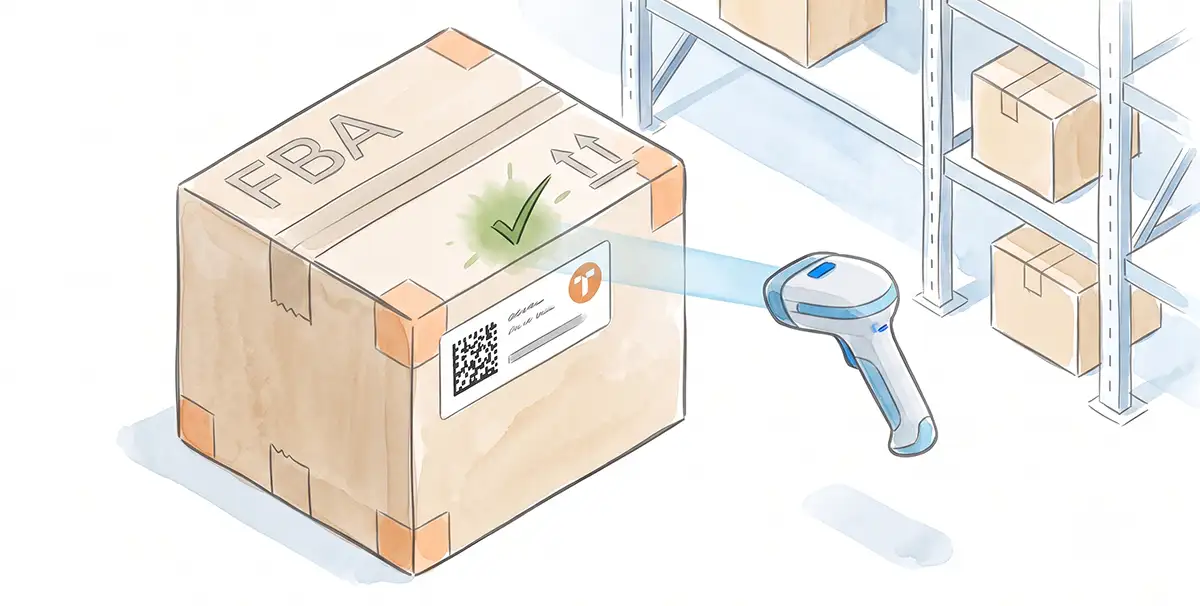
When inventory arrives at an FBA warehouse, staff scan the Transparency code. If it’s missing, invalid, or already scanned on another unit, the inventory gets flagged as potential counterfeit, quarantined, and blocked from fulfillment. For Merchant Fulfilled (FBM) orders, Amazon requires the seller to enter the unique Transparency code before confirming shipment and printing the carrier shipping label.
Transparency is the strongest of the three programs against counterfeiting — it also puts the most work on you: code generation, Transparency label formatting, and physically applying the label during manufacturing or packaging.
How the Three Programs Play Out Against a Hijacker
Picture the same hijacker attempting to sell knockoffs on your private-label listing under each program:
With Brand Registry alone, they list their product successfully. You discover it a week later, buy a test unit, confirm it’s fake, file an IP report, and lose Buy Box share and pick up negative reviews while Amazon investigates.
With Project Zero, you spot the offer and delete their listing yourself within minutes — but if they already shipped a few customer orders before you caught it, those bad reviews can still land on your page.
With Transparency, the hijacker can’t even get inventory into FBA. Receiving centers scan the shipment, find no genuine Transparency code issued to your brand, and reject it at the dock — before a single fake unit reaches a customer.
Do You Need Transparency Labels?
Whether to enroll in Transparency depends on your scale and how much operational overhead you can absorb. It’s worth doing when:
- You face persistent listing hijackers: unauthorized sellers routinely jump on your top-performing ASINs with low-quality replicas.
- Brand reputation is highly sensitive: you sell health supplements, cosmetics, food items, or premium electronics, where counterfeits are a safety risk as well as a trust problem.
- You’re scaling multi-channel sales: you sell on your own website, in retail, and on Amazon, and want customers to verify authenticity through the Amazon consumer app regardless of where they bought the item.
Once an ASIN is enrolled, Amazon expects 100% of your manufactured units for that ASIN to carry a valid Transparency code — whether they’re headed to FBA, FBM, your own DTC store, or physical retail. If an FBA warehouse receives an enrolled ASIN without a valid Transparency label on the box, that inventory gets stalled, marked unfulfillable, and potentially disposed of or returned at your expense.
This is where most brands hit a wall. Amazon gives you the raw Transparency code data (usually a CSV or text export of alphanumeric strings and 2D Data Matrix keys), but it doesn’t format that data into ready-to-print Transparency labels sized for your label sheets, thermal printer, or packaging layout. Turning a code export into a compliant, scannable Transparency label template is a separate job — and it’s the one most sellers underestimate.
Printing Amazon Transparency Labels
Once your product is enrolled in Transparency and you’ve pulled your codes from the Self-Service Portal, Amazon requires three specific elements to appear on the outside of every unit’s packaging — whether as a standalone label or built directly into your packaging artwork:
- The Transparency logo (or logo lockup)
- A call-to-action, such as “Scan with the Transparency App”
- A 2D Data Matrix barcode
Amazon’s Brand Guidelines document covers exact placement rules, and your onboarding call will walk through the specifics — but once you know what content needs to go on the package, the real decision is how you’re going to produce it. Amazon gives you three ways to apply that content, and which one you need determines which Label Resizer tool fits your workflow.
Option 1: Pre-Defined Transparency Labels
Amazon publishes four pre-defined label layouts with fixed minimum sizes. You can order these through a Transparency Service Provider, a commercial printer, or print them yourself.
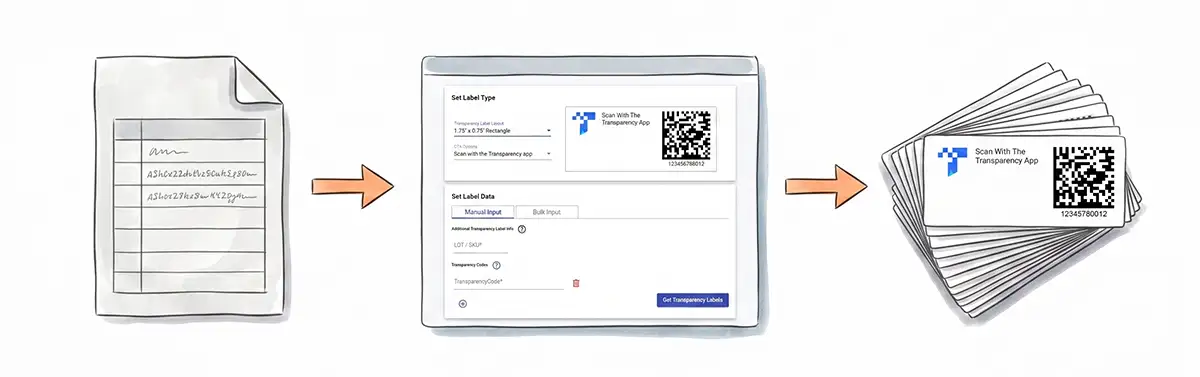
This is exactly what the Transparency Label Maker is built for. Pick one of the pre-defined Transparency layouts, enter each code — and any extra info like a Product ID (GTIN or SKU) — one at a time or in bulk, and generate print-ready labels sized to Amazon’s requirements without any manual layout work.
Option 2 & 3: Custom Labels and Design-In
If you’re already applying a label to your product, it’s usually more efficient to fold the Transparency content into that existing label instead of adding a second one. The same applies if one of Amazon’s pre-defined layouts doesn’t fit your product and needs to be modified — or if you’d rather skip a separate label altogether and build the Transparency logo, CTA, and 2D code directly into your existing packaging artwork. Either path works with a TSP or commercial printer, as long as you meet Amazon’s minimum size requirements, and any custom label or design-in artwork has to be sent to Amazon for approval before use.
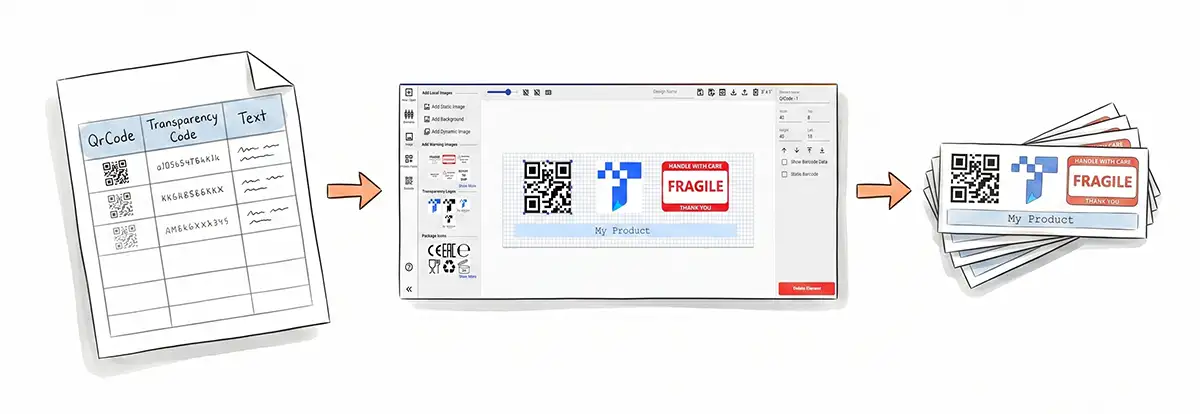
Both routes come down to the same problem: you need a specific, non-standard layout applied consistently across a batch of unique codes. That’s where the Label Editor comes in. Unlike the pre-defined layouts in Option 1, you’re not limited to fixed label sizes — you can design at any dimension you need, and choose between roll/thermal formats or sheet paper layouts like Avery. Build the exact label or artwork layout you need — your own size, your own branding, your own placement of the logo, CTA, and barcode — then generate a CSV data template for that design. Fill the template with your Transparency codes and any per-unit info, and the Label Editor batch-generates every label in your custom design, styled exactly the way you designed it.
Building an End-to-End Brand Defense
These three programs aren’t alternatives — they stack:
- Start with Brand Registry for legal ownership and marketing features.
- Add Project Zero for fast, self-service listing takedowns if counterfeiters target your catalog.
- Enforce Transparency on your core, high-volume, or high-risk ASINs to lock down the supply chain itself, not just the listing.
If you go the Transparency route, budget time for the label side of it too. Whether you need Amazon’s pre-defined layouts through the Transparency Label Maker, or a custom label and design-in workflow through the Label Editor, getting the packaging content right is what turns a Transparency enrollment into inventory that actually clears FBA receiving.